 iColoring
Free
iColoring
Free
iColoring is an AI-driven intelligent coloring page generation tool that supports four core functions: text to coloring page, photo to coloring page, AI automatic coloring, and online coloring. For parents, educators, and coloring enthusiasts, generate free, watermark-free, printable black and white line drawings.
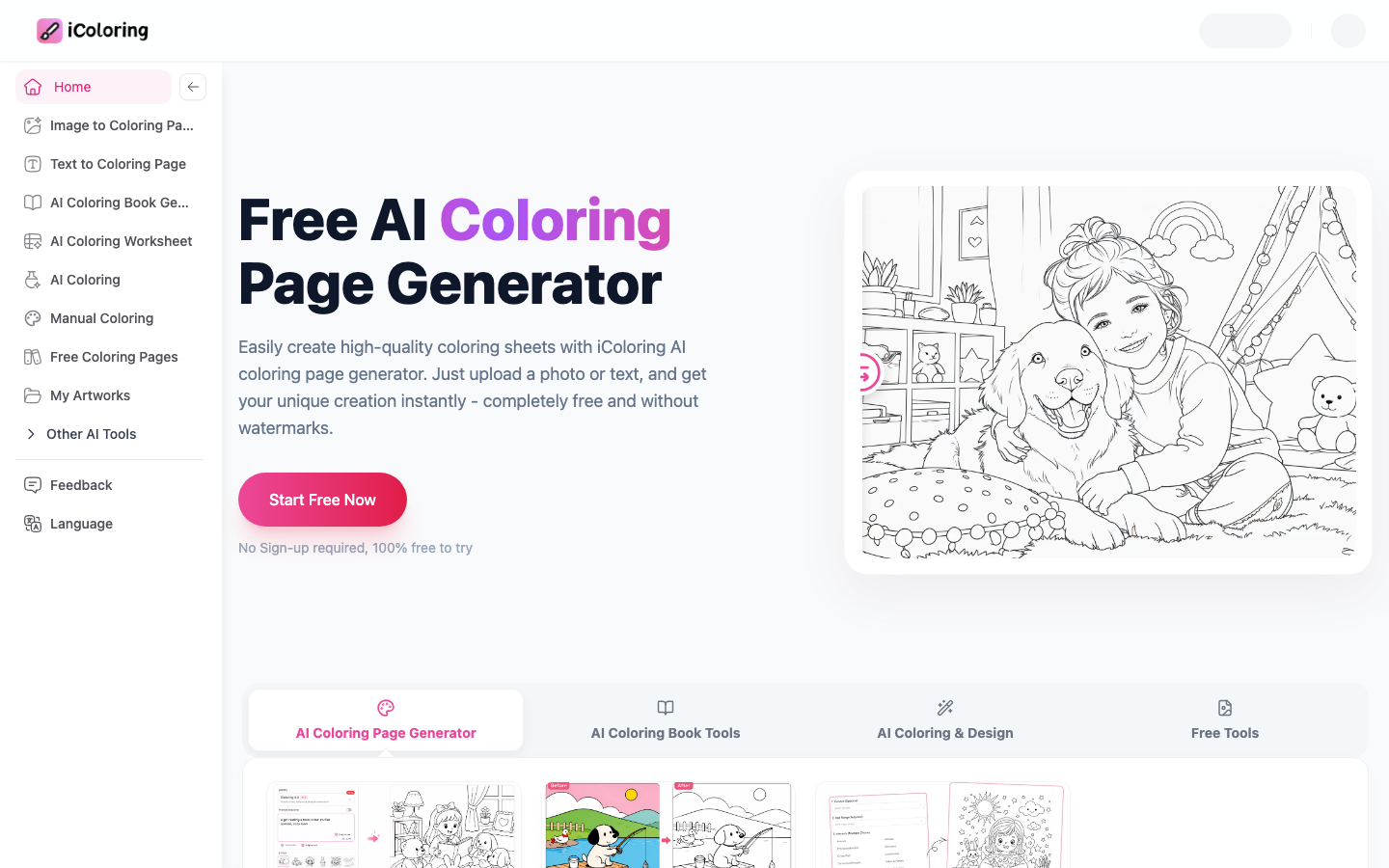
iColoring: AI coloring page generator that turns imagination into black and white line drawings
Core parameters and statistics of iColoring
iColoring is an AI productivity tool focusing on the vertical scene of coloring pages. It does not belong to the general image generation track, but accurately solves the specific need of "how to quickly obtain a printable high-quality black and white line drawing". The product provides services in the form of a Web, developed and operated by REFAR LTD (registered in London, UK).
| Projects | Public Information |
|---|---|
| Product positioning | AI coloring page generator (text/picture → black and white line drawing) |
| Core capabilities | Convert text to coloring page, convert photo to coloring page, AI automatic coloring, online manual coloring, coloring book generation |
| Underlying model | iColoring 3.0 (text), iColoring Image 2.0 (picture), iColoring Colorizer 2.0 (coloring), Nano Banana (coloring book) |
| Product form | Web (responsive, supports desktop and mobile browsers) |
| Business model | Freemium (free quota + subscription) |
| Place of Residence | US (operating company REFAR LTD is registered in London, UK) |
| Supported languages | English |
| Online time | ~2024-12 |
| Free Content Library | 825+ Free Printable Coloring Pages |
| Output format | PNG, PDF |
| Community Channels | Facebook, X (Twitter), Discord, Pinterest |
Brief review in one sentence: iColoring is not a "drawing tool", but a "dedicated production line for coloring pages" - enter a description or upload a photo, and directly output a printable A4/Letter black and white line drawing with closed lines, clear boundaries, and controllable complexity. It is essentially different from general image generators such as Midjourney.
User and market recognition of iColoring
Pioneer in the segmented track: AI coloring page generation is a highly vertical market segment with far fewer participants than the general image generation field. iColoring’s direct competitors in this track include Crayola AI, ColoringPagesAI, etc., but iColoring’s functional coverage (text generation + photo conversion + AI coloring + online coloring + coloring book generation) is significantly wider.
User Group Portraits: The product page shows that its core users are divided into four categories - children and their parents (family parent-child activities), adult coloring enthusiasts (reducing stress and relaxing), educators (classroom teaching materials), designers and creators (picture books/book design assistance). The official website displays user reviews from different roles such as graphic designers, stay-at-home mothers, art therapists, teachers, software engineers, marketing managers, etc., which reflects the cross-population acceptance of the product.
The attraction of free content library: iColoring provides 825+ free printable coloring pages, covering popular themes such as animals, unicorns, dinosaurs, butterflies, Spider-Man, Pikachu, etc. These contents form the natural traffic entrance of the product. The specific number of monthly active users and registrations are subject to official disclosure.
Social media and community building: The product has established official accounts on Facebook, X (Twitter), Discord, Pinterest and other platforms. The Discord community provides communication and feedback channels for creators.
The cost advantage of iColoring: the cost reduction jump from buying books to free customization
- C-side/Individual: Usually a free version is provided to experience the core functions, and high-frequency use requires a paid package subscription.
- API/Developer: Billed by call volume, suitable for development teams that can be flexibly integrated into their own systems.
- Enterprise/Privatization: Contact the business owner to obtain customized quotation and deployment plan. The specific price is subject to the official real-time pricing page.
Main functions of iColoring
iColoring has built a complete tool chain from generation to coloring to output around the core scenario of "coloring pages".
-
Text to Coloring Page: Enter a text description (such as "a cute cat wearing a hat"), and AI will generate the corresponding black and white line drawing in a few seconds. Applicable scenarios: Quickly obtain customized coloring content to replace fixed-pattern coloring books. Actual value: Parents can enter their children’s interest topics of the day (dinosaurs, unicorns, Pokémon) to generate content that their children really want to paint, thereby increasing participation.
-
Photo to Coloring Page / Image to Coloring Page: Upload family photos or any pictures, AI will automatically extract the outlines and convert them into black and white line drawings. It supports five styles: Default, Cartoon, Snoopy, Detail, and Sketch, and provides advanced options such as background removal, watermark removal, and resolution enhancement (1K/2K). Applicable scenarios: Convert family photos, pet photos, travel scenery and other personal memories into colorable line drawings.
-
AI Colorizer: Upload the coloring page line drawing and enter the color description, AI will automatically color the line drawing and generate a color image. Built-in two fine-tuned LoRA coloring models. Applicable scenarios: Provide color inspiration for children's coloring works, and assist picture book designers to quickly generate color samples. Actual value: For users who are not good at color matching, AI coloring provides a low-threshold experience of "describing and drawing" - say "rainbow unicorn" and AI will automatically fill in the color.
-
Online Coloring: Digitally color hand- or AI-generated line drawings directly in the browser, supporting operations such as undo/redo, erasure, canvas scaling, and free color selection. Applicable scenarios: Digital coloring experience without pen and paper. The work is automatically saved to the cloud and can be edited at any time.
-
AI Coloring Book Generator: Input the theme description and reference pictures, and AI will batch generate coloring pages with consistent character styles. It can be used with the AI Book Cover Generator to complete the production of a complete set of coloring books. Applicable scenarios: Coloring book publishers and individual creators can quickly create coloring books.
-
Additional tools: Name Coloring Pages, Letter Coloring Pages, Graffiti Coloring Pages, Image to Line Drawing, Photo to Sketch, Image to PDF Converter, etc.
[Expert View]: The core competitiveness of iColoring does not lie in the prominence of a single function, but in the completeness of the function chain - from generation (text/photo) → coloring (AI automatic/manual online) → output (PDF/PNG/printing) → publishing (coloring book + cover), covering the complete life cycle of "coloring pages". This means users don’t need to switch between multiple tools: there’s no need to generate line art in Midjourney, then export it to Photoshop for adjustments, and then upload it to Canva for typesetting. The entire process is implemented on one iColoring platform, which is a real improvement in workflow efficiency.
iColoring model and version evolution
iColoring’s product iteration is clearly divided into three stages, corresponding to the launch of different model capabilities:
Mainline version context
| Version | Time | Core Changes |
|---|---|---|
| iColoring 1.0 | ~2024-12 | Initial release, supports the basic functions of converting text to coloring page and converting photo to coloring page |
| iColoring 2.0 | ~2025-12 | Added AI Colorizer (coloring model) and online coloring function, the product has expanded from "generating" to "coloring" |
| iColoring 3.0 series | ~2026-06 | Multi-model architecture upgrade: text model iColoring 3.0 (enhanced prompt understanding and fidelity), image model iColoring Image 2.0, coloring model iColoring Colorizer 2.0, new Nano Banana coloring book generation model |
Currently active model
- iColoring 3.0 (text model): The official website is marked as "NEW", focusing on smart model, advanced prompt understanding and exceptional fidelity. Suitable for text-to-coloring page scenarios, supporting a total of 10 styles including Default, Cartoon, Anime, Lego, Intricate, Minimalist, Geometric, Sci-Fi, Kawaii, and Chibi.
- iColoring Image 2.0 (image model): Suitable for converting photos into coloring pages, supporting five styles: Default, Cartoon, Snoopy, Detail, and Sketch.
- iColoring Colorizer 2.0 (coloring model): Enhanced version of coloring model, supports multi-language prompts.
- Nano Banana: Fast and accurate image editing model, suitable for detail adjustment in coloring book generation.
The above version dates are all inferred from the milestones on the product page. The unofficial exact release date is subject to the official update log.
Technical advantages of iColoring
The core challenge of coloring page generation: The optimization goal of general image generation models (such as Stable Diffusion, Midjourney, DALL-E) is to score on "aesthetic quality" and output color images with rich colors and complex light and shadow. Coloring page generation requires the exact opposite image distribution - pure black and white, closed lines, clear block boundaries, and no fill colors. iColoring solves this distribution shift problem through the following technical means:
- Model fine-tuning for line drawings: LoRA or full-parameter fine-tuning is performed on the basic diffusion model. The training data is mainly manual line drawings and children's coloring books, so that the model learns to generate black and white images "suitable for coloring". Key indicators include line closure rate (which directly affects the ability to color), boundary clarity (which affects the difficulty of identifying blocks), and detail density (which affects age group adaptation).
- Multi-model divide-and-conquer architecture: Use different dedicated models (text 3.0 / image 2.0 / coloring 2.0) for different scenarios instead of using a general model to solve all problems. This architecture allows each model to achieve the ultimate in its own data distribution and avoid "all-powerful but mediocre".
- Style controllable generation: Through prompt engineering and condition control (ControlNet/similar mechanism), precise control of line drawing style (cartoon/realistic/minimalist/complex) and output ratio (1:1/2:3/3:4/9:16/16:9) is achieved without the need for the user to describe the style parameters in the prompt word.
- AI Colorizer's dual LoRA strategy: The coloring model uses two separately fine-tuned LoRA modules, one is responsible for line recognition and boundary maintenance, and the other is responsible for color filling and style transfer. The two work together to achieve the effect of "describe and color".
Comparison with general tools: The general AI image generator can also generate black and white line drawings through prompts, but there are often problems such as broken lines, blurred areas, background noise, etc., and the direct printing and coloring experience is very poor. iColoring's dedicated optimization turns these "edge issues" into "core capabilities", which is exactly the value of vertical scene tools.
How to use iColoring
iColoring currently only provides web services, no download and installation is required, and it supports desktop and mobile browser access.
Function entry comparison
| Function | Access path | Usage |
|---|---|---|
| Text to coloring page | icoloring.ai/text-to-coloring-page | Enter text description → Select style and size → Click to generate → Download PNG/PDF |
| Convert photo to coloring page | icoloring.ai/image-to-coloring-page | Upload image → Select style → Adjust advanced options (remove background/remove watermark/resolution) → Generate |
| AI automatic coloring | icoloring.ai/ai-colorizer | Upload line drawings or select existing works → Enter color description → Generate color images |
| Online coloring | icoloring.ai/online-coloring | Upload line drawings → Use the brush/color selection/undo tools in the browser for digital coloring |
| Coloring book generation | icoloring.ai/ai-coloring-book-generator | Enter the theme + Upload the reference image → Select the model (Nano Banana) → Generate a coloring book with consistent characters |
| Free coloring pages library | icoloring.ai/coloring-pages-free | Browse 825+ preset coloring pages → Download and print directly |
Typical steps (taking text to coloring page as an example)
- Visit icoloring.ai/text-to-coloring-page
- Describe the desired coloring page theme in the input box (supports English, 0-2000 characters), you can use "Translate" to translate or "Inspire me" to get inspiration
- Select a style (10 options: Default/Cartoon/Anime/Lego/Intricate/Minimalist/Geometric/Sci-Fi/Kawaii/Chibi)
- Select the output ratio (1:1/2:3/3:4/9:16/16:9)
- Click "Generate" and wait for generation
- Preview the result and download it in PNG or PDF format when satisfied
- Print out (A4/Letter paper) and start coloring
Deduction time: A single generation takes about 5-15 seconds, and it takes about 30-60 seconds from opening the page to completing the download.
Product Pricing for iColoring
The pricing model is subject to the official real-time page. Usually a freemium or subscription system is used, and basic functions can be used for free. Advanced functions or high-frequency use require paid subscriptions, and users are advised to evaluate the optimal solution based on actual usage.
Application scenarios of iColoring
Quantitative deduction of cost reduction and efficiency improvement
| Scenario | Traditional method | Using iColoring | Efficiency improvement |
|---|---|---|---|
| Parents looking for coloring content for their children | Purchase coloring books ($10-20/book) or search and print online, which takes 15-30 minutes | Enter the theme to generate it directly, 30-60 seconds to complete | The time is reduced from minutes to seconds, and the cost is reduced from $10-20 to $0 |
| Teachers prepare classroom coloring materials | Online search→filtering→download→typesetting→printing, takes 30-60 minutes/topic | Instantly generate according to the course theme, 2-3 minutes/topic | Efficiency increased by 10-20 times, and the content fully matches the course |
| Coloring book publisher produces new book | Contracted illustrator ($500-2000/book), cycle 2-4 weeks | AI generates first draft + manual refinement, completed in 1-3 days | Cycle time reduced from weeks to days, cost reduced by 80-95% |
| Adult coloring enthusiasts | Buy adult coloring books ($8-15/book), with fixed patterns | Generate your favorite themes (mandala/landscape/animals), unlimited | From buying fixed patterns to customizing on demand, the freshness is greatly improved |
Detailed explanation of typical scenarios
-
Family parent-child education: Parents instantly generate coloring pages based on their children's current interests (dinosaurs, space, princesses, animals). Actual benefits: Traditional coloring books can only provide fixed patterns, and if children are not interested, they will be left idle; iColoring allows parents to "keep up with the changes in their children's interests". If they like dinosaurs today, they will generate dinosaurs, and if they like cars tomorrow, they will generate cars, always keeping their children's participation.
-
K-12 Classroom Teaching: Teachers generate matching coloring materials based on the course theme—letter coloring pages are generated when learning letters, animal coloring pages are generated when learning animals, and planet coloring pages are generated when learning the solar system. Actual benefits: From "spending time searching online for matching coloring pages" to "instantly generating based on today's lessons", the content is completely aligned with the teaching objectives. For ESL (English as a Second Language) teaching scenarios, coloring pages combined with word learning are particularly effective.
-
Children's content creation (YouTube/self-media): Children's content creators use iColoring to batch-generate coloring content, and use it with video tutorials or live coloring to attract parent-child audiences. Actual benefits: AI generation replaces manual drawing, and creators can focus on content planning and teaching interaction.
-
Coloring book independent publishing: Using the AI coloring book generator + AI book cover generator, independent creators can complete a 20-30 page coloring book within a week and self-publish through platforms such as Amazon KDP. Actual benefits: Traditional coloring book publishing requires contracting illustrators, layout design, and printing proofing, which takes 2-4 weeks; AI assistance can compress the process to 1-3 days, significantly lowering the entry barrier.
-
Adult Stress Reduction and Art Therapy: Adult coloring enthusiasts generate complex line drawings such as mandalas, flowers, landscapes, etc. for stress relief coloring. Art therapists can customize coloring materials according to patient needs. Actual Benefits: While traditional adult coloring books have fixed patterns, iColoring can be customized according to personal preferences, improving immersion and therapeutic effects.
Dimensionality reduction combat scene: A family education scene that requires a large amount of customized coloring content. Traditional coloring books are a one-time purchase—buy a 30-page coloring book and your child will finish it in 3 days and then want a new one. iColoring is generated on demand, with an unlimited supply, and the theme is completely determined by the child. In this scenario, the traditional publishing model is completely unable to compete.
Applicable groups of iColoring
-
Parents (especially parents of preschoolers): Provide an endless supply of customized coloring content for your children. Prerequisite: Basic English description ability is required. Inappropriate boundaries: If the child does not need screen intervention at all (hopes for a pure paper experience), parents can first generate and print it on the computer, and the child will only be exposed to paper line drawings.
-
K-12 Educators: Generate instructional coloring materials to accompany classroom activities. Prerequisite: The course topic needs to be described with English keywords. Does not fit the boundaries: For art classes that require extremely high publishing quality, AI line drawings may not be as artistic as professional hand drawings.
-
Coloring book publishers and independent creators: Use AI to batch-generate coloring book content, significantly reducing the production cycle and cost. Prerequisite: You need to understand the commercial licensing terms, and only the Artist or Business package supports commercial use. Not suitable for boundaries: The top art coloring book market (such as limited editions in collaboration with famous artists) still requires manual creation, and AI is only suitable for the middle and low-end markets or the first draft stage.
-
Children's content creator (YouTuber/self-media blogger): Produce coloring video content and parent-child interaction materials. Prerequisites: Continuous topic creativity and English description skills are required.
-
Stress Relief Coloring Lovers for Adults: Generate personalized complex line drawings for relaxing coloring. Prerequisites: None. Not fitting borders: If you need a finished painted painting rather than a line drawing, you should use the AI Colorizer function instead of pure line drawing generation.
-
Art Therapists & Special Education Practitioners: Customized coloring materials for specific therapy topics (emotion recognition, social stories, sensory stimulation). Prerequisite: There needs to be a clear treatment topic and corresponding English description.
Not suitable for people: ① Business scenarios that require the quality of professional publishing-level coloring books (the precision and artistry of line drawings are not as good as those of professional illustrators, and the commercial authorization of the Artist/Business package also has usage conditions); ② Scenarios that require color image generation rather than black and white line drawings (the core value of iColoring lies in "black and white line drawings", and color generation is an auxiliary function); ③ Heavy users who don't want to pay for generated results and are sensitive to watermarks/resolution (the free tier may not be limited enough to support large daily builds).
Summary and Outlook
Core Competencies: iColoring's core competitiveness does not lie in the basic capabilities of the AI model, but in the in-depth understanding of the vertical scene of "coloring pages" - the lines must be closed, the boundaries must be clear, the complexity needs to be controllable, and the output needs to be suitable for printing. These requirements, which are "marginal issues" in general AI tools, have become core product capabilities in iColoring. The completeness of the functional chain (from generation to coloring to publishing on one platform) further strengthens competition barriers.
Current limitations: ① The language support is only in English, and the threshold for Chinese users to get started is high; ② The points and watermark restrictions of the free tier are not friendly enough for heavy users; ③ Although the coloring book character consistency has been improved through the Nano Banana model, there is still a gap with the style consistency of professional illustrators; ④ There is no mobile app, and offline scenarios cannot be used; ⑤ The batch mode and API interface have not yet been opened, limiting enterprise-level application scenarios.
Follow-up observation points: ① Whether the language expansion plan (especially Chinese support) is on the agenda; ② The actual experience and enterprise scenario coverage after the batch mode is launched; ③ Whether the API is open and the pricing strategy; ④ The consistency and style diversity of the characters generated by the coloring book continue to improve; ⑤ The long-term sustainability of the free tier - if the free quota is significantly reduced, it may lead to user loss.
Acquisition/Adoption Risk Assessment: For personal or educational use, the free tier is a zero-cost trial with minimal risk. For creators or publishers with commercial needs, it is recommended to start with the Hobby or Artist package and spend 1-2 months to evaluate whether the production quality and commercial licensing terms meet actual needs. Enterprises need to confirm before purchasing: ① Whether the commercial authorization covers the intended use (such as resale, derivatives, digital distribution); ② Whether the output resolution meets printing requirements; ③ SLA and service availability terms (there is currently no public SLA commitment); ④ Data privacy policy - whether the uploaded images will be used for model training. It is recommended to contact the business through support@icoloring.ai for confirmation before signing the contract.
Related tools:  Midjourney, stable-diffusion
How to use iColoring
- Web client: You can use it by visiting the official website and registering an account. Most functions do not require installation.
- API access: Provides RESTful API, developers can obtain the API Key and integrate it into their own applications.
Version Info
- iColoring 3.0 (Text Model) / iColoring Image 2.0 / iColoring Colorizer 2.0 :Updated the multi-model architecture, upgraded the text model to 3.0, the image model to 2.0, the coloring model to 2.0, and added the Nano Banana coloring book generation model. There is no official precise date yet.
- iColoring 2.0 :Added AI Colorizer coloring function and online coloring function. There is no official precise date yet.
- iColoring 1.0 :The initial version supports the basic functions of converting text to coloring page and converting photo to coloring page. There is no official precise date yet.
User Reviews