 Magic Patterns
Free
Magic Patterns
Free
Magic Patterns is a AI image and design tool for product managers, designers and engineering teams. The official document positions it as an "AI design tool for product teams". Its key capabilities include using the real design system to generate interactive prototypes Figma, import/export GitHub, synchronize MCP project delivery and team collaboration.
MagicPatterns
Core parameters and statistics
The product positioning of Magic Patterns is very clear: it is not a simple image generator, nor a design assistant that only outputs static wireframes, but an AI prototyping tool for product teams. Its Welcome document splits the target group into product managers, designers, engineers, and marketing/sales/website builders. The core path is "Describe screens or processes -> Generate interactive prototypes -> Iterate with real design systems -> Deliver engineering or Figma".
| Projects | Public Information |
|---|---|
| Official positioning | AI design tool for product teams |
| Core form | Web-side AI prototype and design editor |
| Main target audience | Product managers, designers, engineers, marketing/sales teams |
| Design system | Support components Typography & Icons, Colors, Rules, Skills, Access & Settings |
| Import ability | Figma, GitHub, NPM package, local code folder, website/Chrome Extension, Prompting |
| Export capability | Figma, GitHub two-way synchronization, code download Copy as prompt, MCP, Integration Skill |
| API | v3 API to create/iterate designs, read/write artifact files, publish changes |
| MCP | Supports Claude.ai Connector, Cursor, Claude Code, custom MCP configuration |
| Latest public update | 2026-06-19 Folders |
| Home | US |
Boundary Note: Magic Patterns is more suitable for generating and iterating "interactive software interface prototypes" and is not suitable as a general poster, illustration, video or 3D asset production tool. Its value is focused on product UI, design systems, and engineering delivery links rather than pan-visual content generation.
User and market recognition
Magic Patterns disclosed in the Series A and Magic Patterns 2.0 announcement on 2025-11-11 that 1,500+ product teams have used its AI design tool, and announced that it has received $6 million in Series A financing. Investors include Standard Capital, Y Combinator, and Essence VC, Pioneer Fund, Twenty Two Ventures and others participated. The announcement also mentioned that customers cover fast-growing startups and AI-native enterprises, and listed corporate customer signals such as Origami Risk, Lendi Group, and Ovative Group.
Market Implications: 1,500+ product teams indicates that it has moved beyond the simple early demonstration stage and entered the product team workflow trial and deployment stage; $6 million Series A indicates that the team is still in the accelerated construction period, and the subsequent feature rhythm and commercial terms will continue to change. For enterprise users, the risk in adopting such tools is not “whether a page can be generated”, but whether the quality of design system import, engineering delivery quality, authority management and collaboration processes can host real projects.
Cost advantage
The cost advantage of Magic Patterns is not as simple as "it's cheaper to generate an interface once", but to compress the prototype rework of repeated communication between PM, design, and front-end into the same iterable interface. The pricing document charges the plan by workspace, and credits are used for AI generation. Non-AI actions such as manual editing, exporting, and sharing do not consume credits; this allows the team to split the cost into a three-tier assessment of "seat fee + AI generation quota + corporate governance terms".
| Cost levels | Official public prices/rules | Applicable methods | Boundaries that need to be verified |
|---|---|---|---|
| C-side/Individual | Free: $0/seat/mo, 100 monthly credits | Quickly verify the generation quality, editor experience and export path | Whether the free tier has watermarks, collaboration and export capability restrictions |
| Professional team | Starter: $20/seat/mo, annual payment $17/seat/mo, 1,000 monthly credits | Small team pilot real project, support design systems, GitHub sync, MCP, remove brand watermark | Up to 10 paid seats, upgrade required if exceeded |
| Product Team | Business: $100/seat/mo, annual payment $85/seat/mo, 5,000 monthly credits | 11+ paid seats, SSO, role permission usage reporting, faster AI models | Specific permissions, auditing and model capabilities are subject to the real-time page |
| Enterprise / Private Governance | Enterprise: Custom | 11+ paid seats, shared credit pooling, SCIM & audit logs, TAM, priority support, flexible contracts | Contracts, data residency, audit reports and security terms subject to business confirmation |
Hidden costs: Figma export will convert the currently seen code interface into a static snapshot, and the interaction will not be completely migrated to Figma; the current documentation of GitHub sync states that it supports React + Vite code template. If the team already has a complex front-end framework, component specifications, or multi-warehouse engineering structure, it is necessary to verify the adaptability of the exported code to the existing engineering specifications during the pilot.
Main functions
- AI prototype generation: Generate pages and processes starting from natural language descriptions, screenshots or existing interfaces, suitable for product managers to quickly turn requirements into discussable interfaces.
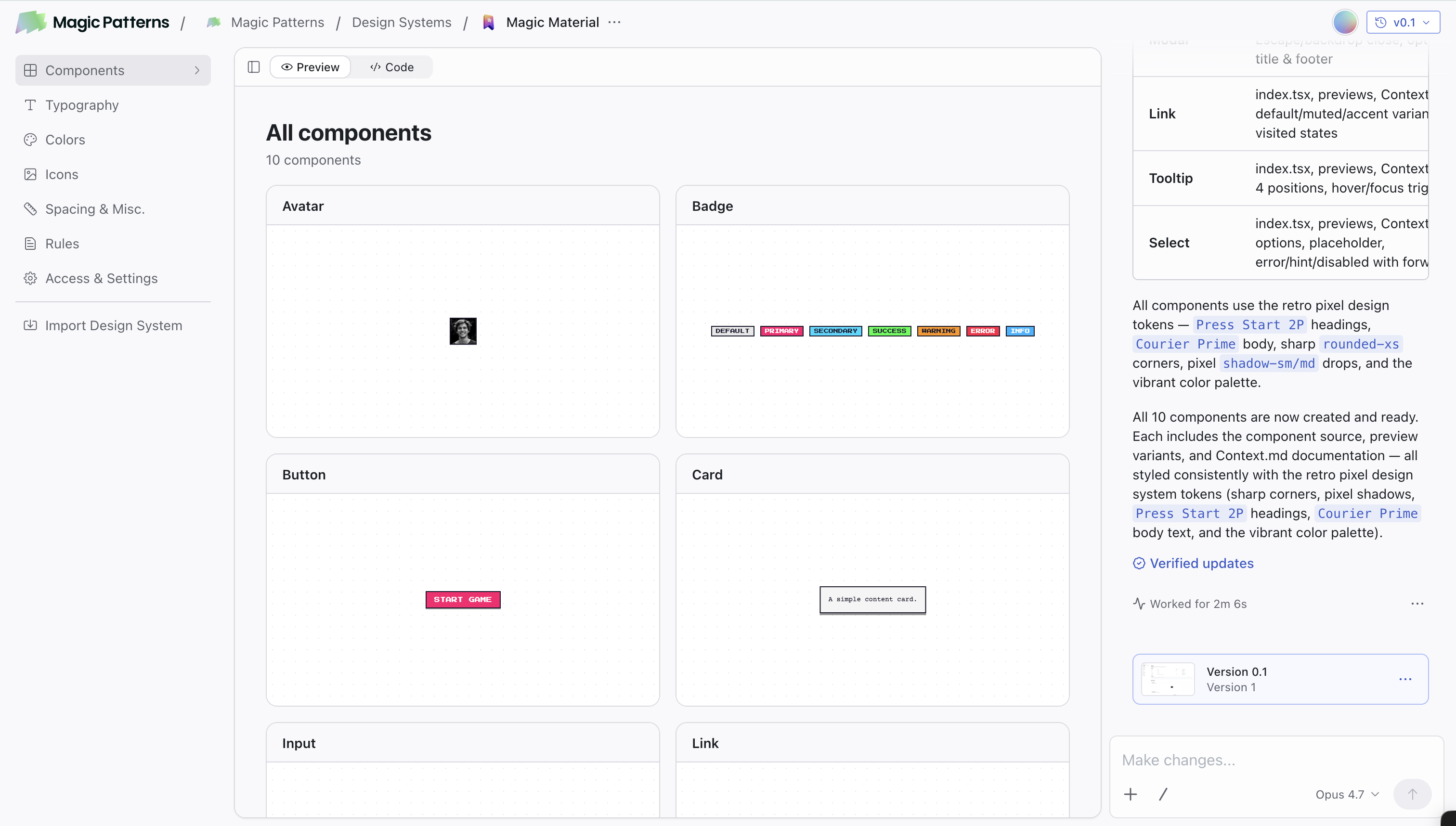
- Real Design System: Design System documents use components, font icons, colors, rule skills, and access settings as unified configurations. The team's real components and styles can be reused when AI is generated, instead of re-guessing the visual specifications every time.
- Figma Import and Export: Supports importing from Figma frame/component to Magic Patterns, and can also export the current Magic Patterns view as a Figma static layer, which is suitable for connecting back and forth between design tools and code prototypes.
- GitHub two-way synchronization: The synchronization document states that a new GitHub repository can be created, and push/pull changes between Magic Patterns and GitHub are supported, making it easier for engineers to continue development in environments such as Cursor.
- MCP Project Delivery: MCP documentation supports Claude.ai Connector, Cursor, Claude Code and API key authentication, allowing engineering agents to directly reference Magic Patterns design.
- Team Collaboration: Live Multiplayer documentation states that in the same design or canvas, member avatars, chat threads, generated results, and previews will be updated in real time; read-only members can follow and leave inline comments.
- Publish and Share: The Unified Share panel of 2026-06-18 merges collaboration and publishing into the Share panel, supporting invitations, permissions clean preview link, custom URL, password protection, automatic publishing of OG metadata and custom domain names.
Key points for acceptance: Magic Patterns has a long function chain. Three things should be verified at the same time during the pilot: whether the generated UI conforms to the design system, whether the exported/synchronized code is convenient for project takeover, and whether the collaboration permissions can cover the team's real process.
Model and version evolution
Magic Patterns is a cloud product that continues to iterate. The official does not provide traditional semantic version numbers, so the version context is more suitable to be recorded according to public milestones. Magic Patterns 2.0 on November 11, 2025 is an important watershed in product positioning: the official has expanded the focus from "prompt features to life" to importing custom design systems, reusing product styles, importing components into AI-native editors, real-time collaboration, and enterprise features.
Public Milestones
- 2025-11-11 Magic Patterns 2.0: Official blog reveals 2.0, $6M Series A, 1,500+ product teams, and emphasis on custom design system, component import, live canvas, and enterprise features.
- 2026-06-11 Context Ring / 1M Context Window: The release log disclosed Context Ring, 1M Context Window,
/Summarize,/Clear, indicating that the product began to strengthen long context management. - 2026-06-15 Improved Inspiration Mode: The release log states variants fullscreen, concepts stream live, and 3x faster, which are used to expand the number of solutions in the exploration phase.
- 2026-06-16 CSV File Support: CSV files can be used as prompt context for tables, charts, and data-driven UI.
- 2026-06-18 Unified Share panel: The collaboration and publishing portals are merged to reduce the operational split from internal review to external publishing.
- 2026-06-19 Folders: The dashboard supports folders, designs and canvases, which can be organized by folders and set folder sharing permissions.
API and engineering interface
The API documentation makes it clear that v3 is the current API surface that can create and iterate designs, poll for status, read/write artifact files, publish changes, and align with the Magic Patterns MCP server endpoint-for-endpoint. The Legacy v2 API is marked deprecated and new integrations should use v3; this is critical for teams preparing to automate internally.
Technical advantages
Code First Generation: The official 2.0 announcement emphasizes the focus on frontend code generation since its initial release in 2023. Mechanically, code priority can preserve routing hover state and dynamic behavior; in effect, it is more suitable as a starting point for project delivery than pure static design drawings; applicable scenarios are product prototypes, front-end pages, business processes, and interaction state verification.
Real Design System Injection: Magic Patterns supports importing design systems from GitHub, NPM packages, Figma, local code folders, and websites. Mechanically, AI can read components, colors, fonts, rules and real import paths before generation; In effect, it reduces UIs that “look like but cannot be implemented”; applicable scenarios are SaaS, enterprise backends, official websites and App WebView prototypes that already have component libraries.
Project Agent Connection: MCP and v3 API expose design, artifact files, prompt history, version history and publish workflow to external tools. Mechanically, Cursor, Claude Code or Claude.ai can access the design context through standard interfaces; effectively, engineers do not have to manually copy screenshots or code snippets; the applicable scenario is the engineering handover from prototype to real code base.
Collaboration and permissions built in: Team Workspaces, Live Multiplayer, inline comments, Share panel and Enterprise SSO/SCIM integrate team governance into the product itself. Mechanically, design, feedback, preview and release flow in the same workspace; In effect, it reduces version drift between PM, design, engineering and business parties; applicable scenarios are cross-functional team reviews and customer previews.
How to use
| Entrance | Typical steps | Suitable for the task |
|---|---|---|
| Web Editor | Enter magicpatterns.com, describe the page or process, upload screenshots or references, generate and iterate with Visual Edit/Prompt | Quickly make product prototypes, page revisions, and customer demonstrations |
| Design Systems | Create a design system, import Figma/GitHub/NPM/local code or website, configure components, colors, rules, typography | Let AI generate according to the team's real UI specifications |
| Figma | Connect to Figma, copy and paste frame/component or paste URL to import; when exporting, switch to the target view first and then Export to Figma | Convert design draft to interactive prototype, or prototype reflow design tool |
| GitHub | Install the Magic Patterns GitHub App in the paid plan, select an organization and create a repo, and follow up with two-way sync | The project will take over Cursor development and code version management |
| MCP / API | Configure MCP in Cursor/Claude Code/Claude.ai, or use v3 API key to call interfaces such as design/status/artifact/publish | Automated delivery, engineering agent reference design context |
Standard implementation path: First use Free or Starter to generate a real business page; then import it into the team design system to compare components, colors, fonts and spacing to see if they are consistent; then use GitHub sync or MCP to take over the project; finally use the Share panel for permissions, preview and release verification.
Product Pricing
The pricing structure of Magic Patterns is based on workspace. Members may join multiple workspaces at the same time, and different workspaces can be in different plans. Credits are automatically refreshed every month for AI generation; on-demand usage, design systems, removed brand watermark GitHub sync and MCP are open from Starter, Business adds faster AI models, SSO, role permissions and usage reporting, Enterprise adds shared credit pooling, SCIM & audit logs, TAM, priority support for custom contracts and flexible invoicing.
| Plan | Monthly payment price | Annual payment conversion | Monthly credits | Key capabilities |
|---|---|---|---|---|
| Free | $0/seat/mo | $0/seat/mo | 100 | Basic trial |
| Starter | $20/seat/mo | $17/seat/mo | 1,000 | Up to 10 paid seats, on-demand usage, design systems, remove brand watermark GitHub sync, MCP, centralized billing |
| Business | $100/seat/mo | $85/seat/mo | 5,000 | 11+ paid seats, faster AI models, self-serve SSO, roles & permissions, usage reporting |
| Enterprise | Custom | Custom | Custom | Shared credit pooling, SCIM & audit logs, TAM, priority support, custom contracts, flexible invoicing |
Billing Boundary: API v3 usage uses normal Magic Patterns credit balance, without separate API subscription; when credits are missing, v3 calls that consume credits will return 402, and read endpoints can still work. Enterprises should confirm credit pooling, audit logs, data processing agreements SSO/SCIM and custom contract terms before purchasing.
Application scenarios
- Product requirements to high-fidelity interactive prototypes: Product managers can directly convert user flows and page goals into clickable prototypes for review, customer interviews, and requirement clarification. The focus of acceptance is whether the critical path is complete, whether the status is covered, and whether the copy is close to the business.
- UI exploration driven by existing design systems: Design teams can import Figma, GitHub or NPM component libraries to make the generated results fit the real brand and components. The focus of acceptance is component reusability, design token consistency and maintainability.
- Engineering handover and front-end startup: Engineering teams can bring designs into the code editor through GitHub sync, download code, Copy as prompt, MCP, or Integration Skill. The focus of acceptance is the adaptation of generated code structure, dependency stack, component import path and existing engineering specifications.
- Customer demos and release previews: Sales, marketing, and solutions teams can release controlled previews using Share panel, preview link, custom URL, password protection, and custom domain. Acceptance focuses on access rights, brand metadata, and mobile responsive performance.
- Data-driven UI first draft: CSV File Support allows tables, charts, and data-based backend pages to generate first drafts from data context. The focus of acceptance is field mapping, data display logic and exception status.
Applicable people
- Product Manager: Suitable for quickly converting requirements documents, user processes and screenshots into reviewable prototypes, reducing the waiting time of "text requirements -> design draft -> front-end demo".
- Designer/Design System Leader: Suitable for teams that already have component libraries, color tokens, fonts, and rules. Use AI to expand the scope of solution exploration while maintaining brand consistency.
- Front-End Engineers/Engineering Agent Users: Ideal for teams that need to go from prototype directly into Cursor, Claude Code or GitHub, especially for workflows that want to use MCP/API to read design context.
- Marketing, Sales and Website Team: Suitable for quickly generating landing pages, event pages, customer demo pages, and displaying them by publishing links or customizing domain names.
- Unfit Boundary: Teams that have no design system, no front-end delivery requirements, and only need static images or marketing visuals may not be able to give full play to the advantages of Magic Patterns; projects that have strong constraints on pixel-level Figma restoration, complex back-end logic, or production-level code quality need to retain manual design and engineering review.
Summary and Outlook
Magic Patterns’ core competency lies in bringing AI prototyping, real design systems, team collaboration and engineering delivery in the same link. It is not just "generating a UI diagram", but allows the product team to form relationships from ideas, design systems, interactive interfaces Figma, GitHub, MCP to API automation. Magic Patterns 2.0, v3 API, MCP, GitHub sync and recent high-frequency changelog illustrate that its product focus is expanding from rapid production to team-level workflow.
The current limitations are also clear: Figma export is a static snapshot, and interactions will not be fully migrated; GitHub sync documents disclose that React + Vite code template is currently used; complex enterprise projects still need to verify component import, permission management credit consumption, compliance terms, and generated code quality. It is recommended that the team first pilot a low-risk real page to quantify prototype generation time, design system hit rate, project takeover time and number of reworks; when these indicators are stable, then expand to multi-role collaboration GitHub to bidirectionally synchronize MCP engineering agents and enterprise contracts.
Related tools:  Midjourney, stable-diffusion
Version Info
- Folders :The release log discloses that the Folders function is online, which can organize designs and canvases by folders in the dashboard, and supports folder-level sharing permissions.
- Unified Share panel :Publishing log disclosure The Share panel combines collaboration and publishing portals, the Collaborate label supports invitations, permissions, and preview links, and the Publish label supports custom URLs, password protection, automatic publishing, metadata, and custom domain names.
- Magic Patterns 2.0 :The official blog announced Magic Patterns 2.0, with highlights including a custom design system, component import AI-native editor, real-time collaboration and enterprise features.
User Reviews