 MutableAI
Free
MutableAI
Free
MutableAI is an AI code reconstruction and code base understanding platform for developers. It supports VS Code and JetBrains IDE plug-in web applications and CLI tools. It provides multi-file reconstruction, code search and interpretation, automatic defect detection, automatic station meeting reporting, automatic Wiki and automatic bug repair, covering all scenario code workflows from individual developers to corporate teams.
Tool text
Core parameters and statistics
| Project | Specifications |
|---|---|
| Product positioning | AI-driven code base-level refactoring and code understanding platform |
| Delivery form | Web SaaS + IDE plug-in (VS Code / JetBrains) + CLI + API |
| Established | 2021 |
| Place of Residence | United States (US) |
| Category | AI programming (ai-coding) |
| Free tier | Support (Individual permanently free) |
| IDE Support | VS Code, JetBrains |
| Entry form | Web application, desktop IDE plug-in CLI terminal tool REST API |
| Code base size | Supports medium and large code bases (Pro limit 40K tokens / 4 medium-sized warehouses) |
| LinkedIn Follows | ~1,000 |
| Twitter Follow | ~412 |
MutableAI's core capabilities cover workflow from code understanding to code generation to automatic documentation. Different from single-file completion tools, it is oriented to "code base level" operations - collaborative reconstruction of multiple files after understanding the context of the entire warehouse, which has direct value for technical debt cleanup and architecture upgrades in medium and large projects.
User and market recognition
- Developer Coverage: The product is oriented to individual developers, technical teams and enterprises in Freemium mode, and provides two mainstream IDE plug-ins, VS Code and JetBrains, to reach a wide range of technical groups.
- Community Attention: About 1,000 LinkedIn followers, about 412 Twitter followers, and YouTube channel with product demonstration videos (including MutableAI Accelerate and app.mutable.ai feature introductions).
- Third Party Rating: The overall score on the SaaSworthy platform is 75% (60% functionality, 60% evaluation, 67% momentum, 65% popularity), which is above average among similar AI code generation tools.
- Enterprise Adoption: Provides Enterprise customized solutions, covering AI integration testing, dashboards, enterprise-level support and local deployment, indicating that there are already customers with medium-sized and above teams.
The product has not yet disclosed the specific number of users or customer cases of well-known enterprises. The evaluation of market recognition needs to be comprehensively judged based on trial experience and community reputation.
Cost advantage
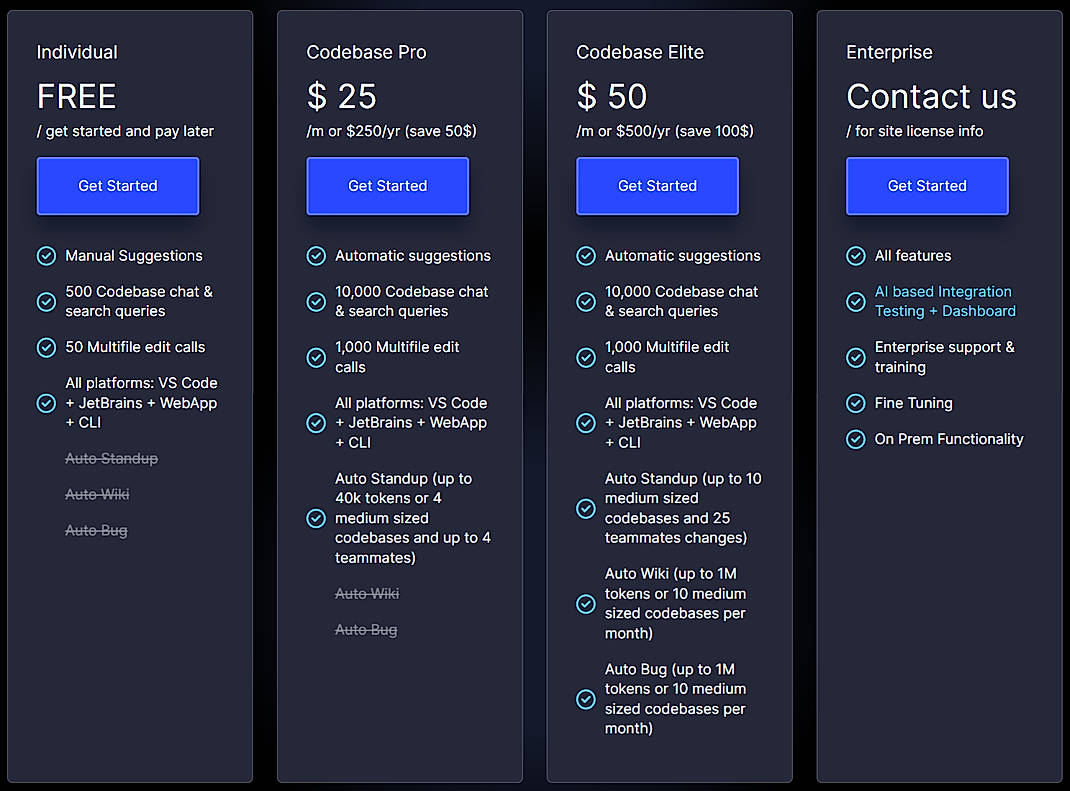
MutableAI adopts a three-tier pricing structure, covering different budget and demand levels from individual developers to enterprise teams:
Individual/Free Tier: The Individual plan is permanently free, including 500 code base searches/conversations for manual code suggestions, 50 multi-file editing calls, and supports full platform access to VS Code, JetBrains, Web, and CLI. Suitable for independent developers to try out early adopters and small projects.
Developer/Professional Tier: Codebase Pro is $20.83 per month ($250 annually), unlocks automatic code suggestions, 10,000 searches/conversations, 1,000 multi-file edit calls, and Auto Standup functionality (automatically generates codebase progress reports, capped at 40K tokens or 4 medium-sized repositories + 4 team members). Compared with AI programming assistants at the same price, the multi-file editing quota is relatively abundant.
Team/Flagship Tier: Codebase Elite is $41.66 per month (annual payment is $500). Based on Pro, it adds Auto Wiki (automatically generates code base documents, upper limit of 1M tokens / 10 medium-sized warehouses) and Auto Bug (automatic defect detection and repair, same amount). Suitable for systematic use by technical teams of 5-15 people.
Enterprise Tier: Enterprise is a customized quote that includes all functional AI integration testing and dashboards, enterprise-level support and training, model fine-tuning, and on-premises deployment options. Ideal for organizations with stringent requirements for data sovereignty and security compliance.
The core difference in the cost structure is that MutableAI uses "code reconstruction workflow" instead of "code completion" as the pricing unit. The number of multi-file editing calls directly corresponds to the actual amount of reconstruction tasks, making the costs more predictable for severe reconstruction scenarios.
Main functions
- Multi-file AI Refactoring: Automatically perform collaborative refactoring operations across multiple files based on an understanding of the entire code base. It is not limited to single file modification, but instead perceives the dependencies between files to make consistent changes. It is suitable for scenarios such as architecture upgrade, API migration, and design pattern unification.
- Code Base Search and Interpretation: Search the code base for pieces of logic through natural language, and AI provides context-sensitive explanations. Help new members quickly get started with unfamiliar warehouses, or locate specific function implementations in large code bases.
- Automatic Code Suggestions (Pro+): Automatically analyze the code base context during the coding process and proactively push improvement suggestions, including performance optimization, best practices, potential defect warnings, etc., similar to having a 24-hour online senior Code Reviewer.
- Auto Standup (Pro+): Automatically scans changes in the code base and generates a structured progress report, covering modified files, scope of impact, to-do items, etc., replacing manual writing of standup daily reports. It directly improves the efficiency of daily synchronization of agile teams.
- Auto Wiki (Elite+): Based on the code base structure and implementation logic, it automatically generates cross-file architecture documents and module descriptions, solving the classic problem of documents lagging behind the code. Output a code base knowledge base that can be read by team members and stakeholders.
- Auto Bug (Elite+): Automatically analyzes abnormal patterns, potential defects and logical errors in the code base, generates repair suggestions and can perform multi-file repairs. Quality gates for CI/CD pipelines.
- Cross-platform workflow: Achieve seamless switching between cloud and local environments through CLI tools, and support CI/CD pipeline integration. Developers can freely switch working contexts between the terminal IDE and the web interface.
Model and version evolution
MutableAI's version evolution revolves around the path of "from single-file assistance to code base-level automation":
Initial verification period (2021-2022)
The company was founded in 2021 and has undergone about a year of internal R&D and testing. The Beta version (v0.9) will be put into trial at the end of 2022, verifying the core technical route of multi-file reconstruction and AI code understanding.
Public beta release (2023)
The v1.0 version will be officially released in mid-2023 and will be open to the public. The first edition focuses on three major capabilities: AI codegen-driven multi-file reconstruction, code base natural language search and interpretation, VS Code plug-in and web application. The product starts to build awareness among the developer community.
Automation suite release (2024-present)
v2.0 (Auto Suite) is an important milestone for the product. It adds three major automation capabilities: Auto Standup, Auto Wiki, and Auto Bug, upgrading MutableAI from an "auxiliary refactoring tool" to a "code base automation management platform." At the same time, JetBrains IDE support is expanded, CLI tools are improved, and Enterprise tiered pricing is launched. The current product is still under continuous iteration, and the official website has not announced a specific update log and technical roadmap.
Technical advantages
Codebase-level context awareness: Unlike code completion tools based on single-file context, the core difference of MutableAI lies in its global understanding of the entire codebase. It will parse the dependency graph, type reference and call chain between files before performing reconstruction to ensure the consistency and integrity of multi-file changes. This mechanism can substantially improve the accuracy of scenarios such as API version migration and cross-layer reconstruction.
Incremental code base index: The product adopts an incremental indexing mechanism, which only processes the changed parts after the first full analysis, reducing the perceived delay of large-scale warehouses. When a user initiates a search or refactoring request, the system performs inference on the indexed code graph instead of performing a full scan every time. This means lower wait times for active repositories that are under continuous development.
Multiple exit forms cover the entire workflow: Through the four entrances of VS Code plug-in, JetBrains plug-in, Web application and CLI, it covers the complete development link from real-time reconstruction in the IDE to automatic inspection of the CI/CD pipeline. CLI tools are particularly suitable for automating script pre-commit hooks and continuous integration scenarios, transforming code refactoring from "manual operations" to "programmable automated steps."
Layered automation capabilities: Manual Suggestions → Auto Suggestions → Auto Standup → Auto Wiki → Auto Bug. Each capability upgrade reduces one dimension of repetitive work. This layered design allows teams to gradually adopt based on maturity rather than switching all at once.
How to use
Entrance 1: VS Code plug-in Search for "MutableAI" in the VS Code extension market and install it. After installation, you can use it by logging in with your GitHub or Google account. The plug-in provides function entrances such as code refactoring and search Auto Standup.
Entrance 2: JetBrains plug-in Install the MutableAI plug-in in the plug-in market of JetBrains IDE (IntelliJ IDEA, PyCharm, WebStorm, etc.). After logging in, the experience will be consistent with the VS Code version.
Entrance Three: Web Application Visit https://mutable.ai/ to register an account and use functions such as code search, explanation, and Auto Standup directly on the browser. Suitable for temporary code review or situations where plug-ins cannot be installed.
Entry 4: CLI tool Install MutableAI CLI via npm or binary package to perform code refactoring, search, and automation tasks in the terminal. Typical usage process:
- Install CLI:
npm install -g @mutableai/cli(subject to official documents) - Login authentication:
mutable login - Execute refactoring or analysis commands in the root directory of the code repository
Entrance 5: REST API Enterprise users can integrate MutableAI capabilities into their own workflows and CI/CD pipelines through APIs to achieve automatic code review and quality gate control.
Note: The official website is currently inaccessible. It is recommended to obtain the latest installation information through the IDE plug-in market or product social media account.
Product Pricing
MutableAI adopts a hybrid pricing model of "freemium + subscription + enterprise customization":
| Plan | Price | Core Quota | Applicable Scenarios |
|---|---|---|---|
| Individual (Free) | $0 | 500 searches/conversations + 50 multi-file edits | Personal trial, small project trial |
| Codebase Pro | $20.83/month ($250 annually) | 10,000 searches/conversations + 1,000 multi-file edits + Auto Standup | Independent developers, small teams |
| Codebase Elite | $41.66/month (annual payment $500) | Elite quota + Auto Wiki + Auto Bug | Medium-sized R&D team |
| Enterprise | Customized quotation | Full functionality + AI integration testing + local deployment + fine-tuning | Scenarios where enterprises have strict requirements for security compliance |
- The free quota is reset on a natural monthly basis, and unused calls will not be accumulated.
- Both Pro and Elite support monthly payment and annual payment, and annual payment enjoys a discount of approximately 17%.
- Enterprise solutions require contacting sales to obtain quotations and support local deployment and privatization.
- Pricing information comes from third-party aggregation platforms, and the official real-time page shall prevail.
Application scenarios
- Technical Debt Cleanup of Large Code Bases: Systematically restructure the warehouse that has accumulated technical debt for many years - unify naming conventions, extract common modules, and eliminate duplicate code. Suitable for mature teams with regular refactoring plans, use Auto Bug to detect potential defects and use Auto Wiki to synchronize documents.
- API version migration and architecture upgrade: When a breaking change occurs in the framework or internal API, use the multi-file reconstruction capability to complete cross-warehouse call point migration in one go. Compared with manually modifying files one by one, the risk of omissions can be greatly reduced. Auto Bug for the Elite tier automatically detects compilation or runtime errors introduced by API changes after migration.
- New member code base onboarding training: Using the code base search and explanation function, new members can directly use natural language to ask "What is the payment process of this module" or "Where is the logic of user authentication" when joining the project, and AI will give contextual answers and code positioning. Reduce the onboarding cost for new members and reduce immediate interruptions to senior members.
- Agile Team Standup Automation: Auto Standup automatically summarizes code base changes and generates structured progress reports, which is suitable for distributed teams and synchronization preparation before daily standup meetings. For compliance scenarios with strict documentation requirements, Auto Wiki can be continuously updated as a code base and documentation.
- CI/CD Quality Gating: Integrate Auto Bug into the CI/CD pipeline through CLI tools to automatically detect potential defects introduced before merging the request. Suitable for teams with mandatory access control requirements for code quality, as a supplementary layer to existing lint/static analysis tools.
Applicable people
- Independent Developers/Freelancers: The free tier allows you to experience multi-file reconstruction and code search capabilities, which is suitable for managing multiple small projects or personal open source warehouses. It is recommended to start with the Individual plan and upgrade as needed based on the frequency of reconstruction.
- Small and medium-sized R&D teams (5-20 people): The target group of the Pro or Elite plan. The value of Auto Standup and Auto Wiki is higher in team collaboration than in individual use. It is recommended to pilot it in a single repository first to evaluate the accuracy of automatic reporting before extending it to all code repositories.
- Enterprise Architect/Technical Lead: A role focused on codebase health and technical debt governance, leveraging multi-file refactoring and Auto Bug for architecture-level inspections and automated fixes. The Enterprise solution's on-premises deployment and fine-tuning capabilities meet data sovereignty and customization needs.
- Not applicable: For developers with pure front-end projects and small code bases (<10K lines), the search/replace function of traditional IDEs may already meet their needs, and the marginal benefits of introducing MutableAI are limited. In scenarios where there is a strong need to completely generate code independently rather than refactor it (such as building a new project from scratch), code generation tools (such as GitHub Copilot) may be more straightforward.
Summary and Outlook
Core Advantages: MutableAI's core competitiveness lies in its "code base level" rather than "single file level" AI assistance capabilities. It connects refactoring, search, documentation, and defect detection into an automated workflow, covering the complete link from code understanding to code generation to document synchronization. It is particularly valuable in code bases of medium or larger sizes. The three-tier pricing structure provides a progressive upgrade path for teams of different sizes.
Current Limitations: The official product website is currently inaccessible, and access to version updates and community interactive information is limited, which may affect the discovery and trial experience of new users. There are few public customer cases and user scale data, and there is insufficient reference basis for enterprise-level adoption. Although third-party ratings are at an above-average level, there is still a gap in brand recognition and community activity compared with leading AI programming tools.
Purchasing/Adoption Recommendations: It is recommended to start with the Individual free tier to verify the accuracy of multi-file reconstruction and the reporting quality of Auto Standup in real projects. Upgrade to Pro/Elite Plan Team Pilot once match is confirmed. Enterprise customers need to focus on verifying the following before signing up for Enterprise: the specific resource requirements for local deployment, the data isolation mechanism for model fine-tuning, and the availability commitments in the SLA terms. Since the official website is temporarily inaccessible, it is recommended to install and try it directly through the IDE plug-in market, or follow its social media channels for the latest updates.
Related tools:  Cursor
Version Info
- Auto Suite :Introduce automatic standup report (Auto Standup), automatic Wiki and automatic bug repair functions, extend IDE support to JetBrains, and improve the accuracy of multi-file reconstruction. There is no official precise date yet.
- Initial Release :The first version, based on AI codegen's multi-file reconstruction and code base search/explanation functions, supports VS Code plug-ins and web applications. There is no official precise date yet.
- Beta Preview :Internal test version to verify the core capabilities of multi-file reconstruction and AI code understanding. There is no official precise date yet.
User Reviews